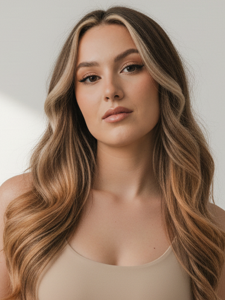
A hairstyle transformation is a visual preview, not a salon guarantee. Rollip uses the portrait, the chosen style, and the scene’s existing light to generate a new image. The goal is to keep the person recognisable while changing the visible hair shape, colour, or texture.
What the editor reads from a portrait
The editor looks for the face, hairline, head position, current hair silhouette, lighting direction, and nearby background. Those signals help it place new hair around the forehead and shoulders and decide where highlights and shadows belong.
A front or three-quarter view usually provides the most information. Extreme profiles, hats, large headphones, and cropped crowns hide areas that the transformation would otherwise use as anchors.
What should stay consistent
A useful preview should preserve identity, expression, skin tone, pose, clothing, and the broad structure of the background. Small differences can occur because the output is generated rather than painted onto individual pixels, so compare the entire face—not only the new hair—before deciding whether a result is useful.
- Hairline placement should look plausible at the temples and forehead.
- Strands should follow the original direction of light.
- Longer styles should interact naturally with shoulders and clothing.
- Colour should affect the hair without tinting skin or the background.
Why the same style varies between photos
A preset describes a target, but the starting portrait still matters. A chin-length bob on a side-lit profile will not look identical to the same preset on a front-facing studio portrait. The system adapts the style to the visible head angle, image crop, and colour temperature.
This variation is useful for exploring direction—short versus long, warm versus cool, sleek versus textured—but it should not be treated as an exact prediction of a cut, dye, or how hair behaves in daily life.
How to get a more convincing preview
Start with visible, unobstructed hair and select one style at a time. If you want to compare options, reuse the same source portrait so the differences are easier to judge. Save the results you like, then compare them side by side at the same size.
How to review a Rollip hair result
After selecting a hairstyle in Rollip, compare the generated image with the source at the forehead, ears, shoulders, and brightest side of the face. Those four areas reveal whether the new silhouette follows the person and the original light rather than behaving like a pasted-on layer.
The caramel-waves example keeps the same fictional subject and framing so the hairstyle is the main variable. A useful result preserves the face and scene while allowing small strand-level variation.